
视差滚动:核心思路与最小实现
视差滚动的全部秘密:让不同层以不同速度移动,并且只改 transform。

一、核心思路(一句话)
位移 = 滚动距离 × 系数。
同一段滚动距离,背景乘 0.28,前景乘 0.55。系数不同,速度就不同,纵深就出来了。
背景移动 28px ← 滚动 100px → 前景移动 55px
前景动得快 = 离镜头近;背景动得慢 = 离镜头远。就这么简单。
二、三层结构
视差必须先有"层"。DOM 上至少两层,CSS 上必须是绝对定位 + 相对容器:
html
<header class="hero">
  <div class="hero-bg"></div>     <!-- 远层,慢 -->
  <div class="hero-inner">        <!-- 近层,快 -->
    <h1>标题</h1>
  </div>
</header>css
.hero {
  position: relative;
  height: 100vh;
  overflow: hidden;               /* 裁掉溢出,防止撑破布局 */
}
.hero-bg, .hero-inner {
  position: absolute;
  inset: 0;
  will-change: transform;         /* 提前建图层,避免首帧卡顿 */
}
.hero-bg {
  inset: -30%;                    /* 比容器大,留出移动余量 */
}两个关键点:
overflow: hidden 必须有,否则移动出去的元素会撑出滚动条。
背景要溢出(inset: -30%),否则移动时会露底。溢出量 ≈ 系数 × 最大位移
三、核心代码(10 行)
js
const heroBg    = document.querySelector('.hero-bg');
const heroInner = document.querySelector('.hero-inner');

let ticking = false;

window.addEventListener('scroll', () => {
  if (ticking) return;              // 本帧已排队,丢弃
  ticking = true;
  requestAnimationFrame(() => {
    ticking = false;                // 先解锁,再干活

    const y = window.scrollY;

    heroBg.style.transform    = `translate3d(0, ${y * 0.28}px, 0)`;
    heroInner.style.transform = `translate3d(0, ${y * 0.55}px, 0)`;
  });
}, { passive: true });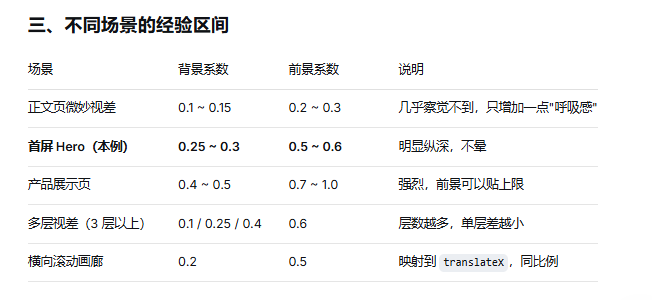
四、执行流程
核心执行流程
用户滚动页面
│
├─ scroll 事件触发(可能每秒上百次)
│
├─ if (ticking) return ← 本帧已排队,直接丢弃
│
├─ ticking = true,请求下一帧
│
▼
浏览器 vsync 到来,执行 rAF 回调
│
├─ ticking = false ← 先解锁,再干活
│
├─ 读 scrollY(读阶段集中)
│
├─ 边界判断:Hero 走远就 return
│
├─ 写 transform / opacity(写阶段集中)
│
▼
GPU 合成,屏幕显示最小DEMO
html
<!DOCTYPE html>
<html lang="zh-CN">
<head>
<meta charset="UTF-8">
<meta name="viewport" content="width=device-width, initial-scale=1.0">
<style>
  * { box-sizing: border-box; margin: 0; }
  body { background: #0b0f1a; color: #fff; font-family: system-ui, sans-serif; }

  .hero {
    position: relative;
    height: 100vh;
    overflow: hidden;
    display: grid;
    place-items: center;
  }
  .hero-bg {
    position: absolute;
    inset: -30%;
    background:
      radial-gradient(circle at 30% 30%, rgba(64,158,255,.35), transparent 55%),
      radial-gradient(circle at 70% 72%, rgba(103,194,58,.22), transparent 55%);
    will-change: transform;
  }
  .hero-inner {
    position: relative;
    text-align: center;
    will-change: transform, opacity;
  }
  h1 { font-size: clamp(28px, 6vw, 56px); line-height: 1.2; }
  p  { color: #8b97ad; margin-top: 16px; }
  .spacer { height: 200vh; padding: 80px 24px; color: #8b97ad; }
</style>
</head>
<body>

<header class="hero">
  <div class="hero-bg"></div>
  <div class="hero-inner">
    <h1>视差滚动</h1>
    <p>向下滚动,观察前后景的速度差</p>
  </div>
</header>

<div class="spacer">
  <p>继续向下滚,Hero 已经离开视口,视差逻辑自动停止计算。</p>
</div>

<script>
  const heroBg    = document.querySelector('.hero-bg');
  const heroInner = document.querySelector('.hero-inner');

  let ticking = false;

  window.addEventListener('scroll', () => {
    if (ticking) return;
    ticking = true;

    requestAnimationFrame(() => {
      ticking = false;

      const y  = window.scrollY;
      const vh = window.innerHeight;

      if (y > vh * 2) return;   // 边界:Hero 走远就停

      heroBg.style.transform    = `translate3d(0, ${y * 0.28}px, 0)`;
      heroInner.style.transform = `translate3d(0, ${y * 0.55}px, 0)`;
      heroInner.style.opacity   = String(Math.max(0, 1 - y / (vh * 0.55)));
    });
  }, { passive: true });
</script>

</body>
</html>完整DEMO
html
<!DOCTYPE html>
<html lang="zh-CN">
<head>
<meta charset="UTF-8">
<meta name="viewport" content="width=device-width, initial-scale=1.0">
<title>ticking + requestAnimationFrame · 高频 UI 效果合集</title>
<style>
:root {
--bg: #0b0f1a;
--card: #151c2c;
--line: #253049;
--txt: #e6ebf5;
--sub: #8b97ad;
--blue: #409eff;
--green: #67c23a;
}
* { box-sizing: border-box; }
html { scroll-behavior: smooth; }
body {
margin: 0;
background: var(--bg);
color: var(--txt);
font-family: -apple-system, BlinkMacSystemFont, "PingFang SC", "Microsoft YaHei", sans-serif;
-webkit-font-smoothing: antialiased;
overflow-x: hidden;
}
/* ============ 顶部滚动进度条(transform: scaleX) ============ */
.progress {
position: fixed; top: 0; left: 0; right: 0; height: 3px;
background: linear-gradient(90deg, var(--blue), var(--green));
transform: scaleX(0);
transform-origin: 0 50%;
will-change: transform;
z-index: 100;
}
/* ============ 右侧 Scrollspy 导航 ============ */
.side-nav {
position: fixed; right: 16px; top: 50%; transform: translateY(-50%);
display: flex; flex-direction: column; gap: 12px; z-index: 90;
}
.side-nav a {
display: block; width: 10px; height: 10px; border-radius: 50%;
background: #2a3448; transition: .25s; text-indent: -999em; overflow: hidden;
}
.side-nav a.active {
background: var(--blue);
box-shadow: 0 0 0 4px rgba(64,158,255,.15);
transform: scale(1.15);
}
/* ============ Hero 视差 ============ */
.hero {
position: relative;
min-height: 100vh;
display: grid;
place-items: center;
overflow: hidden;
}
.hero-bg {
position: absolute;
inset: -20%;
background:
radial-gradient(circle at 30% 30%, rgba(64,158,255,.35), transparent 55%),
radial-gradient(circle at 70% 72%, rgba(103,194,58,.22), transparent 55%);
will-change: transform;
}
.hero-inner {
position: relative;
text-align: center;
padding: 0 24px;
will-change: transform, opacity;
}
.eyebrow {
font-size: 12px; letter-spacing: .22em; text-transform: uppercase;
color: var(--blue); margin: 0 0 18px;
}
.hero h1 {
font-size: clamp(30px, 6vw, 56px);
line-height: 1.2;
margin: 0 0 18px;
letter-spacing: -.02em;
}
.hero-sub { color: var(--sub); font-size: 14px; margin: 0; }
.scroll-hint {
margin-top: 46px;
font-size: 11px; letter-spacing: .3em; color: var(--sub);
animation: bob 1.8s ease-in-out infinite;
}
@keyframes bob {
0%, 100% { transform: translateY(0); opacity: .5; }
50% { transform: translateY(8px); opacity: 1; }
}
/* ============ 通用 section ============ */
section {
max-width: 900px;
margin: 0 auto;
padding: 88px 24px;
}
section h2 {
font-size: 20px; margin: 0 0 8px;
display: flex; align-items: center; gap: 10px;
}
section h2 .num {
display: inline-grid; place-items: center;
width: 26px; height: 26px; border-radius: 8px;
background: rgba(64,158,255,.15); color: var(--blue);
font-size: 13px; flex: none;
}
.sec-desc { color: var(--sub); font-size: 13px; line-height: 1.8; margin: 0 0 26px; }
/* ============ 入场动画卡片 ============ */
.reveal-grid {
display: grid;
grid-template-columns: repeat(auto-fill, minmax(220px, 1fr));
gap: 14px;
}
.reveal {
background: var(--card);
border: 1px solid var(--line);
border-radius: 12px;
padding: 20px;
opacity: 0;
transform: translateY(28px);
transition: opacity .6s cubic-bezier(.2,.8,.2,1),
transform .6s cubic-bezier(.2,.8,.2,1);
will-change: opacity, transform;
}
.reveal.in { opacity: 1; transform: translateY(0); }
.reveal h3 { font-size: 14px; margin: 0 0 8px; }
.reveal p { font-size: 12px; color: var(--sub); line-height: 1.7; margin: 0; }
.reveal:nth-child(2) { transition-delay: .06s; }
.reveal:nth-child(3) { transition-delay: .12s; }
.reveal:nth-child(4) { transition-delay: .18s; }
.reveal:nth-child(5) { transition-delay: .24s; }
.reveal:nth-child(6) { transition-delay: .30s; }
/* ============ 磁吸卡片 ============ */
.tilt-wrap { display: grid; place-items: center; padding: 22px 0; }
.tilt-card {
position: relative;
width: 260px; height: 160px;
border-radius: 16px;
background: linear-gradient(135deg, #1e2740, #2b3552);
border: 1px solid var(--line);
display: grid; place-items: center; gap: 6px;
transform: perspective(700px) rotateX(0) rotateY(0);
will-change: transform;
overflow: hidden;
cursor: crosshair;
}
.tilt-card b { font-size: 18px; letter-spacing: .18em; }
.tilt-card small { font-size: 11px; color: var(--sub); }
.tilt-shine {
position: absolute; inset: 0; pointer-events: none;
opacity: 0; transition: opacity .3s;
}
/* ============ 拖拽分栏 ============ */
.split-box {
display: flex;
height: 220px;
border: 1px solid var(--line);
border-radius: 12px;
overflow: hidden;
background: #0f1420;
}
.pane {
display: grid; place-items: center;
font-size: 13px; color: var(--sub);
font-variant-numeric: tabular-nums;
overflow: hidden;
}
.pane-left { flex: 0 0 50%; background: rgba(64,158,255,.08); color: var(--blue); }
.pane-right { flex: 1; }
.splitter {
flex: 0 0 10px;
background: #232c42;
cursor: col-resize;
display: grid; place-items: center;
touch-action: none;
transition: background .2s;
}
.splitter:hover, body.dragging .splitter { background: var(--blue); }
.splitter i {
width: 2px; height: 26px; border-radius: 2px;
background: rgba(255,255,255,.4);
}
body.dragging { user-select: none; cursor: col-resize; }
/* ============ 计数器 HUD ============ */
.hud {
position: fixed; right: 16px; bottom: 16px; z-index: 95;
background: rgba(21,28,44,.94);
border: 1px solid var(--line);
border-radius: 10px;
padding: 10px 12px;
font-size: 12px;
backdrop-filter: blur(8px);
min-width: 178px;
}
.hud-row {
display: flex; justify-content: space-between; gap: 14px;
line-height: 1.9; color: var(--sub);
}
.hud-row b {
color: var(--txt);
font-variant-numeric: tabular-nums;
font-family: ui-monospace, SFMono-Regular, Menlo, monospace;
}
.hud-row b.hot { color: var(--green); }
.hud button {
width: 100%; margin-top: 8px;
padding: 5px 10px; font-size: 11px;
border: 1px solid var(--line); border-radius: 6px;
background: #232c42; color: var(--sub);
cursor: pointer; transition: .2s;
}
.hud button:hover { border-color: var(--blue); color: var(--txt); }
/* ============ 代码块 ============ */
pre {
background: #080c14;
border: 1px solid var(--line);
border-radius: 10px;
padding: 16px 18px;
overflow-x: auto;
font-size: 12.5px;
line-height: 1.75;
color: #9ecbff;
margin: 0;
font-family: ui-monospace, SFMono-Regular, Menlo, Consolas, monospace;
}
.note {
margin-top: 16px;
padding: 12px 14px;
border-left: 3px solid var(--blue);
background: rgba(64,158,255,.07);
border-radius: 0 8px 8px 0;
font-size: 12.5px;
line-height: 1.8;
color: var(--sub);
}
.note b { color: var(--txt); }
/* ============ 自定义光标 ============ */
.cursor {
position: fixed; left: 0; top: 0;
width: 22px; height: 22px;
border: 1.5px solid var(--blue);
border-radius: 50%;
pointer-events: none;
z-index: 200;
mix-blend-mode: screen;
transform: translate3d(-200px, -200px, 0) translate(-50%, -50%);
}
.cursor::after {
content: '';
position: absolute; left: 50%; top: 50%;
width: 4px; height: 4px;
background: var(--blue);
border-radius: 50%;
transform: translate(-50%, -50%);
}
@media (pointer: coarse) { .cursor { display: none; } }
@media (max-width: 640px) {
.side-nav { display: none; }
.hud { right: 10px; bottom: 10px; transform: scale(.92); transform-origin: bottom right; }
}
</style>
</head>
<body>
<!-- 滚动进度条 -->
<div class="progress" id="progress"></div>
<!-- Scrollspy 导航 -->
<nav class="side-nav">
<a href="#hero" class="active">Hero</a>
<a href="#s1">进度</a>
<a href="#s2">入场</a>
<a href="#s3">光标</a>
<a href="#s4">拖拽</a>
<a href="#s5">原理</a>
</nav>
<!-- ============ Hero:视差 ============ -->
<header class="hero" id="hero" data-spy>
<div class="hero-bg" id="heroBg"></div>
<div class="hero-inner" id="heroInner">
<p class="eyebrow">ticking + requestAnimationFrame</p>
<h1>高频事件<br>每帧只跑一次</h1>
<p class="hero-sub">向下滚动,观察右下角两个计数器的差距 👇</p>
<div class="scroll-hint">SCROLL</div>
</div>
</header>
<!-- ============ 01 滚动进度 ============ -->
<section id="s1" data-spy>
<h2><span class="num">01</span>滚动进度条 & 导航高亮</h2>
<p class="sec-desc">
顶部那条渐变进度条,宽度由 <code>transform: scaleX()</code> 驱动;
右侧圆点则根据各 section 的位置实时切换高亮。两者共用同一次滚动回调。
</p>
<pre><code>const handleScroll = rafThrottle(() => {
// ① 先把要读的全部读完
const y = window.scrollY;
const ratio = y / (document.documentElement.scrollHeight - innerHeight);
const tops = sections.map(el => el.getBoundingClientRect().top);
// ② 再统一写回
progressBar.style.transform = `scaleX(${ratio})`;
tops.forEach((t, i) => links[i].classList.toggle('active', t < innerHeight * .4));
});</code></pre>
<div class="note">
<b>关键点:读写分离。</b>如果一边读 <code>getBoundingClientRect()</code>
一边写 <code>style</code>,浏览器会被迫做同步布局,rAF 省下的性能又还回去了。
</div>
</section>
<!-- ============ 02 入场动画 ============ -->
<section id="s2" data-spy>
<h2><span class="num">02</span>滚动触发的入场动画</h2>
<p class="sec-desc">
元素进入视口后加一个 <code>.in</code> 类,真正的过渡交给 CSS transition 完成。
JS 只负责「判断时机」,不负责「画中间帧」——这是最省性能的分工。
</p>
<div class="reveal-grid">
<div class="reveal"><h3>视差滚动</h3><p>背景层与内容层用不同系数位移,制造纵深。</p></div>
<div class="reveal"><h3>Scrollspy</h3><p>根据滚动位置高亮当前章节的导航项。</p></div>
<div class="reveal"><h3>入场动画</h3><p>进入视口加类名,CSS 接管过渡曲线。</p></div>
<div class="reveal"><h3>懒加载</h3><p>接近底部才发起请求,避免滚动中反复判断。</p></div>
<div class="reveal"><h3>吸顶 Header</h3><p>越过阈值切换固定定位与阴影。</p></div>
<div class="reveal"><h3>进度条</h3><p>scaleX 驱动,走合成层不触发重排。</p></div>
</div>
<div class="note">
这里用的是 rAF 版检测;现代项目也可以用 <b>IntersectionObserver</b>,浏览器原生异步回调更省。
但需要「连续读取滚动比例」的效果,仍得靠 rAF。
</div>
</section>
<!-- ============ 03 光标跟随 ============ -->
<section id="s3" data-spy>
<h2><span class="num">03</span>光标跟随 & 磁吸卡片</h2>
<p class="sec-desc">
<code>pointermove</code> 每秒可触发上百次。这里只记录坐标,
真正的样式更新交给 rAF,并用 lerp 做缓动,跟手又不抖。
</p>
<div class="tilt-wrap">
<div class="tilt-card" id="tiltCard">
<div class="tilt-shine" id="tiltShine"></div>
<b>MAGNET</b>
<small>把鼠标移到卡片上</small>
</div>
</div>
<pre><code>// 事件里只存坐标,不碰 DOM
let pointerX = 0, pointerY = 0;
window.addEventListener('pointermove', e => {
pointerX = e.clientX; pointerY = e.clientY;
if (rafId === null) rafId = requestAnimationFrame(loop);
});
// 循环里做插值 + 写样式,收敛后自动停机
function loop() {
cursorX += (pointerX - cursorX) * 0.16;
cursorY += (pointerY - cursorY) * 0.16;
dot.style.transform = `translate3d(${cursorX}px, ${cursorY}px, 0)`;
rafId = (Math.abs(pointerX - cursorX) > 0.15)
? requestAnimationFrame(loop)
: null; // ← 静止时不烧 CPU
}</code></pre>
</section>
<!-- ============ 04 拖拽分栏 ============ -->
<section id="s4" data-spy>
<h2><span class="num">04</span>拖拽调整分栏宽度</h2>
<p class="sec-desc">
拖动中间的竖条试试。拖拽开始那一刻读一次容器尺寸并缓存,
之后整个拖拽过程只写不读——彻底避开布局抖动。
</p>
<div class="split-box" id="splitBox">
<div class="pane pane-left" id="paneLeft"><span>50%</span></div>
<div class="splitter" id="splitter"><i></i></div>
<div class="pane pane-right">拖拽竖条 ←→</div>
</div>
<pre><code>// 拖拽开始:只读一次
splitter.addEventListener('pointerdown', e => {
const r = box.getBoundingClientRect();
boxLeft = r.left; boxWidth = r.width;
splitter.setPointerCapture(e.pointerId);
});
// 拖拽过程:每帧只写,且永远用最新的指针位置
const applySplit = rafThrottle(clientX => {
const pct = clamp((clientX - boxLeft) / boxWidth * 100, 22, 78);
leftPane.style.flexBasis = pct + '%';
});
splitter.addEventListener('pointermove', e => {
if (dragging) applySplit(e.clientX);
});</code></pre>
</section>
<!-- ============ 05 原理 ============ -->
<section id="s5" data-spy>
<h2><span class="num">05</span>为什么是 rAF,而不是 setTimeout(16)</h2>
<p class="sec-desc">
下面就是整页在用的那个节流工厂。它的全部秘密只有一个布尔锁。
</p>
<pre><code>function rafThrottle(fn) {
let ticking = false;
let lastArgs = null;
return function (...args) {
lastArgs = args; // 永远记住最新一次的参数
if (ticking) return; // 本帧已排队 → 直接丢弃这次
ticking = true;
requestAnimationFrame(() => {
ticking = false; // 先解锁,fn 内部再触发也能正常排队
fn.apply(this, lastArgs);
});
};
}</code></pre>
<div class="note">
<b>① 频率上限 = 屏幕刷新率。</b>60Hz 屏就是每秒最多 60 次,120Hz 屏 120 次,天然对齐 vsync。<br>
<b>② 只保留最后一次参数。</b><code>lastArgs</code> 保证不会用到过期坐标,拖拽不会"追尾"。<br>
<b>③ 后台标签页自动挂起。</b>rAF 在页面不可见时暂停,setInterval 不会(只被压到 1s 一次)。<br>
<b>④ 它是节流,不是防抖。</b>过程帧会保留,只是把帧内的冗余调用丢掉。搜索联想那种「等用户停手」的需求要用 debounce。
</div>
<div class="note">
<b>想看效果:</b>把鼠标滚轮快速滚一下,或拖住右侧滚动条来回拉,
比较右下角「裸 scroll 事件」和「rAF 执行」两个数字——通常会差 2~5 倍。
也可以打开 DevTools → Performance 录制一段滚动,观察 FPS 曲线。
</div>
</section>
<!-- ============ 计数器 HUD ============ -->
<div class="hud">
<div class="hud-row"><span>裸 scroll 事件</span><b id="rawCount">0</b></div>
<div class="hud-row"><span>rAF 回调执行</span><b class="hot" id="rafCount">0</b></div>
<button id="resetCount">重置计数</button>
</div>
<!-- 自定义光标 -->
<div class="cursor" id="cursor"></div>
<script>
/* =====================================================================
0. 通用工具
===================================================================== */
const $ = (sel, root = document) => root.querySelector(sel);
const $$ = (sel, root = document) => Array.from(root.querySelectorAll(sel));
/**
* rAF 节流工厂 —— 全页所有高频事件都用它
* 特性:每帧最多执行一次;永远使用最新一次的参数;后台自动挂起
*/
function rafThrottle(fn) {
let ticking = false;
let lastArgs = null;
return function (...args) {
lastArgs = args;
if (ticking) return; // 本帧已排队,丢弃本次
ticking = true;
requestAnimationFrame(() => {
ticking = false; // 先解锁,fn 内部再触发也能正常排队
fn.apply(this, lastArgs);
});
};
}
/* =====================================================================
1. 滚动相关:进度条 / 视差 / Scrollspy / 入场动画
===================================================================== */
const progressBar = $('#progress');
const heroEl = $('#hero');
const heroBg = $('#heroBg');
const heroInner = $('#heroInner');
const navLinks = $$('.side-nav a');
const spySections = $$('[data-spy]');
const hudRaw = $('#rawCount');
const hudRaf = $('#rafCount');
let rawCount = 0;
let rafCount = 0;
let lastActiveIdx = -1;
let pendingReveals = $$('.reveal'); // 尚未触发的元素,触发后移出数组
function onScrollFrame() {
rafCount++;
hudRaf.textContent = rafCount;
/* ---------- ① 读阶段:一次性把需要的量全部读完 ---------- */
const y = window.scrollY;
const vh = window.innerHeight;
const docH = document.documentElement.scrollHeight - vh;
const ratio = docH > 0 ? Math.min(1, Math.max(0, y / docH)) : 0;
const heroRect = heroEl.getBoundingClientRect();
const spyTops = spySections.map(el => el.getBoundingClientRect().top);
const revealTops = pendingReveals.map(el => el.getBoundingClientRect().top);
/* ---------- ② 写阶段:只写不读 ---------- */
// 进度条
progressBar.style.transform = `scaleX(${ratio})`;
// 视差:只在 Hero 还可见时更新,滚过去就不再浪费
if (heroRect.bottom > 0) {
heroBg.style.transform = `translate3d(0, ${y * 0.28}px, 0)`;
heroInner.style.transform = `translate3d(0, ${y * 0.55}px, 0)`;
heroInner.style.opacity = String(Math.max(0, 1 - y / (vh * 0.55)));
}
// Scrollspy:只在索引变化时才碰 classList
let activeIdx = 0;
for (let i = 0; i < spyTops.length; i++) {
if (spyTops[i] <= vh * 0.4) activeIdx = i;
}
if (activeIdx !== lastActiveIdx) {
lastActiveIdx = activeIdx;
navLinks.forEach((a, i) => a.classList.toggle('active', i === activeIdx));
}
// 入场动画:触发的移出待办数组,越滚越快
if (pendingReveals.length) {
const remain = [];
pendingReveals.forEach((el, i) => {
if (revealTops[i] < vh * 0.88) el.classList.add('in');
else remain.push(el);
});
pendingReveals = remain;
}
}
const handleScroll = rafThrottle(onScrollFrame);
// 裸事件监听:只负责计数 + 转交节流器
window.addEventListener('scroll', () => {
rawCount++;
hudRaw.textContent = rawCount;
handleScroll();
}, { passive: true });
/* =====================================================================
2. 光标跟随(独立的持续循环,收敛后自动停机)
===================================================================== */
const cursorEl = $('#cursor');
let pointerX = window.innerWidth / 2;
let pointerY = window.innerHeight / 2;
let cursorX = pointerX;
let cursorY = pointerY;
let cursorRafId = null;
function cursorLoop() {
cursorX += (pointerX - cursorX) * 0.16;
cursorY += (pointerY - cursorY) * 0.16;
cursorEl.style.transform =
`translate3d(${cursorX}px, ${cursorY}px, 0) translate(-50%, -50%)`;
const settled =
Math.abs(pointerX - cursorX) < 0.15 && Math.abs(pointerY - cursorY) < 0.15;
cursorRafId = settled ? null : requestAnimationFrame(cursorLoop);
}
window.addEventListener('pointermove', e => {
pointerX = e.clientX;
pointerY = e.clientY;
if (cursorRafId === null) cursorRafId = requestAnimationFrame(cursorLoop);
}, { passive: true });
/* =====================================================================
3. 磁吸卡片(mousemove 只记坐标,rAF 里算倾斜)
===================================================================== */
const tiltCard = $('#tiltCard');
const tiltShine = $('#tiltShine');
let cardRect = null;
const applyTilt = rafThrottle((mx, my) => {
if (!cardRect) return;
const nx = (mx - cardRect.left) / cardRect.width; // 0 ~ 1
const ny = (my - cardRect.top) / cardRect.height;
const rotateX = (0.5 - ny) * 16; // 上下倾斜
const rotateY = (nx - 0.5) * 16; // 左右倾斜
tiltCard.style.transform =
`perspective(700px) rotateX(${rotateX}deg) rotateY(${rotateY}deg)`;
tiltShine.style.opacity = '1';
tiltShine.style.background =
`radial-gradient(circle at ${nx * 100}% ${ny * 100}%, rgba(255,255,255,.28), transparent 62%)`;
});
// 进入时读一次 rect —— 此时卡片还没有 transform,读到的值才准
tiltCard.addEventListener('pointerenter', () => {
cardRect = tiltCard.getBoundingClientRect();
});
tiltCard.addEventListener('pointermove', e => applyTilt(e.clientX, e.clientY));
tiltCard.addEventListener('pointerleave', () => {
tiltCard.style.transform = 'perspective(700px) rotateX(0deg) rotateY(0deg)';
tiltShine.style.opacity = '0';
});
/* =====================================================================
4. 拖拽分栏(开始时读一次尺寸,过程中只写)
===================================================================== */
const splitBox = $('#splitBox');
const splitter = $('#splitter');
const paneLeft = $('#paneLeft');
const paneLabel = paneLeft.querySelector('span');
let dragging = false;
let boxLeft = 0;
let boxWidth = 0;
const applySplit = rafThrottle(clientX => {
if (!boxWidth) return;
const pct = Math.min(78, Math.max(22, ((clientX - boxLeft) / boxWidth) * 100));
paneLeft.style.flexBasis = pct + '%';
paneLabel.textContent = Math.round(pct) + '%';
});
splitter.addEventListener('pointerdown', e => {
e.preventDefault();
dragging = true;
splitter.setPointerCapture(e.pointerId);
// 只在拖拽开始读一次,之后全程用缓存值
const r = splitBox.getBoundingClientRect();
boxLeft = r.left;
boxWidth = r.width;
document.body.classList.add('dragging');
});
splitter.addEventListener('pointermove', e => {
if (!dragging) return;
applySplit(e.clientX); // 永远用最新指针位置,中间帧自动丢弃
});
function endDrag(e) {
if (!dragging) return;
dragging = false;
document.body.classList.remove('dragging');
try { splitter.releasePointerCapture(e.pointerId); } catch (_) {}
}
splitter.addEventListener('pointerup', endDrag);
splitter.addEventListener('pointercancel', endDrag);
/* =====================================================================
5. HUD 重置
===================================================================== */
$('#resetCount').addEventListener('click', () => {
rawCount = 0;
rafCount = 0;
hudRaw.textContent = '0';
hudRaf.textContent = '0';
});
/* =====================================================================
6. 初始化:首屏跑一次,保证进度条 / 导航 / 入场状态正确
===================================================================== */
handleScroll();
// 窗口尺寸变化时也需要重算一次(这里顺手用同一个节流器)
window.addEventListener('resize', rafThrottle(onScrollFrame), { passive: true });
</script>
</body>
</html>