
前端面试手写题集合
0. promise 执行过程
js
console.log('scriot start')

async function async1() {
  await async2()
  console.log('async1 end');
}

async function async2() {
  console.log('async2 end');
}

async1()

setTimeout(function() {
  console.log('setTimeout')
}, 0)

new Promise(resolve => {
  console.log('Promise')
  resolve()
})
  .then(function () {
    console.log('promise1')
  })
   .then(function() {
     console.log('promise2')
   })

console.log('script end')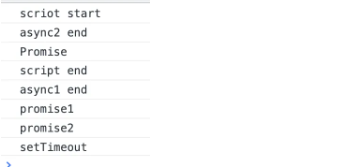
0.1 手写PromiseAll方法
https://juejin.cn/post/7069805387490263047#heading-5
js
Promise.MyAll = (promises)=>{
  let arr = [];
  let count = 0;
  return new Promise((resolve, reject)=>{
    promises.forEach((item, i) => {
      Promise.resolve(item).then(res=>{
        arr[i] = res
        count +=1
        if (count === promises.length) {
          resolve(arr)
        }
      }).catch(reject)
    });
  })
}

const p1 = Promise.resolve('p1')

const p2 = new Promise((resolve, reject) => {
  setTimeout(() => {
    resolve('p2 延时一秒')
  }, 1000)
})

const p3 = new Promise((resolve, reject) => {
  setTimeout(() => {
    resolve('p3 延时两秒')
  }, 2000)
})

const p4 = Promise.reject('p4 rejected')


Promise.MyAll([p1, p2, p3, p4])
  .then(res => {
    console.log(res)
  })
  .catch(err => console.log(err)) // p4 rejected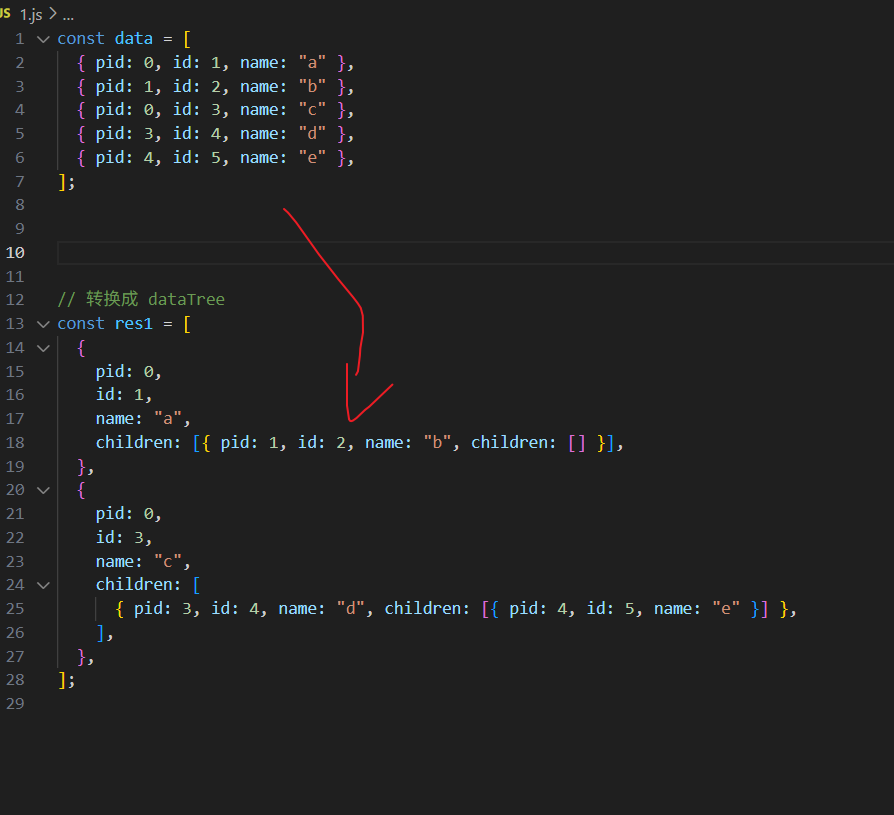
a. 数据结构转换问题
js
const data = [
  { pid: 0, id: 1, name: "a" },
  { pid: 1, id: 2, name: "b" },
  { pid: 0, id: 3, name: "c" },
  { pid: 3, id: 4, name: "d" },
  { pid: 4, id: 5, name: "e" },
];

function formatDataTree(items) {
  let res = [];
  const getChildren = (res, pid) => {
    for (const i of items) {
      if (i.pid === pid) {
        const newItem = { ...i, children: [] };
        res.push(newItem);
        getChildren(newItem.children, newItem.id);
      }
    }
  };

  getChildren(res, 0);
  return res;
}

console.log(formatDataTree(data));

// 转换成 dataTree
const res1 = [
  {
    pid: 0,
    id: 1,
    name: "a",
    children: [{ pid: 1, id: 2, name: "b", children: [] }],
  },
  {
    pid: 0,
    id: 3,
    name: "c",
    children: [
      { pid: 3, id: 4, name: "d", children: [{ pid: 4, id: 5, name: "e" }] },
    ],
  },
];0. 实现 lazy 链式调用 :
person.eat().sleep(2).eat()
js
// 函数的链式调用1. 实现 find 方法,根据 id 查找 data 树中的任意一项
js
// 实现find方法,根据id 查找data树中的任意一项
const data = [
  {
    id: "1000",
    name: "深圳",
    children: [
      {
        id: "1001",
        name: "宝安区",
      },
      {
        id: "1002",
        name: "南山区",
      },
    ],
  },
  {
    id: "2000",
    name: "广州",
    children: [
      {
        id: "2001",
        name: "越秀区",
        children: [
          {
            id: "2002",
            name: "大东街道办事处",
          },
        ],
      },
      {
        id: "2003",
        name: "荔湾区",
      },
    ],
  },
];

const find = (data, id) => {
  for (let item of data) {
    if (item.id === id) {
      return item.name;
    }
    if (item.children?.length) {
      const res = find(item.children, id);
      if (res && res !== "未找到") {
        return res;
      }
    }
  }
  return "未找到";
};

const r1 = find(data, "1000"); // 深圳
const r2 = find(data, "1001"); // 宝安区
const r3 = find(data, "2001"); // 越秀区
const r4 = find(data, "2002"); // 大东街道办事处
const r5 = find(data, "3003"); // 未找到

console.log(r1);
console.log(r2);
console.log(r3);
console.log(r4);
console.log(r5);链式调用函数的方式, 进行加减乘除运算
js
// 链式调用函数的方式, 进行加减乘除运算
class MyCalculator {
  constructor(number) {
    this.number = number;
  }
  add(num) {
    this.number = this.number + num;
    return this;
  }
  minus(num) {
    this.number = this.number - num;
    return this;
  }
  multi(num) {
    this.number = this.number * num;

    return this;
  }
  div(num) {
    this.number = this.number / num;
    return this;
  }

  toString() {
    // 比较时候会触发隐式转换,需要自定义toString方法进行输出
    return this.number;
  }
}

const calculator = new MyCalculator(121);
if (calculator.add(1).minus(2).multi(3).div(4) == 90) {
  console.log("恭喜, 回答正确");
}1. 发布订阅模式
js
2. 防抖函数
js
const func = function (e) {
  // @TODO
  console.log(e.target.value);
  rederCity(this.value);
};
const debounce = function (func, wait) {
  let timerId;
  return function (...args) {
    let _this = this;
    clearTimeout(timerId);
    timerId = setTimeout(() => {
      func.apply(_this, args);
    }, wait);
  };
};

const debounceFunc = debounce(func, 500);

document.getElementById("search-input").addEventListener("input", debounceFunc);3. 节流函数
js
const func = function (e) {
  console.log("timeupdate触发");
  console.log("e:", e);
  localStorage.setItem("currentTime", this.currentTime);
};

function throttle(func, wait = 0) {
  // TODO
  let timeId;
  return function (...args) {
    let _this = this;
    if (timeId) {
      return;
    }

    timeId = setTimeout(() => {
      func.apply(_this, args);
      timeId = undefined;
    }, wait);
  };
}

const throttleFn = throttle(func, 1000);
video.addEventListener("timeupdate", throttleFn);4. 数组去重
方法一:使用 Set
js
function uniqueArray(arr) {
  // @TODO
  return [...new Set(arr)];
}方法二:使用 filter
js
function uniqueArray(arr) {
  // @TODO
  return arr.filter((item, index, self) => {
    return self.indexOf(item) === index;
  });
}方法三:使用 reduce
js
function uniqueArray(arr) {
  // @TODO
  return arr.reduce((prev, curr) => {
    return prev.includes(curr) ? prev : [...prev, curr];
  }, []);
}4.1 实现数组的 myMap 方法
js
Array.prototype.myMap = function (fn, ctx) {
  let ret = [];

  for (let i = 0; i < this.length; i++) {
    ret.push(fn.call(ctx, this[i], i, this));
  }

  return ret;
};

// 测试代码
const nums = [1, 2, 3, 4, 5];
console.log(
  "Map:",
  nums.myMap((x) => x * 2),
  [1, 2]
);4.2 实现数组的 myFilter 方法
js
Array.prototype.myFilter = function (fn, ctx) {
  let ret = [];

  for (let i = 0; i < this.length; i++) {
    const ret1 = fn.call(ctx, this[i], i, this);
    if (ret1) {
      ret.push(this[i]);
    }
  }

  return ret;
};

// 测试代码
const nums = [1, 2, 3, 4, 5];
console.log(
  "Filter:",
  nums.myFilter((x) => x > 2)
);5. 数组扁平化
js
function flatten(arr) {
  // @TODO
  const result = [];

  function flat(arr) {
    for (let i = 0; i < arr.length; i++) {
      if (Array.isArray(arr[i])) {
        flat(arr[i]);
      } else {
        result.push(arr[i]);
      }
    }
  }

  flat(arr);
  return result;
}

// 简化版本
function flattenES6(arr) {
  return arr.flat(Infinity);
}6. 手写 Promise.all
js
Promise.myAll = function (promises) {
  // @TODO
};7. 手写 Promise.allSettled
js
Promise.myAllSettled = function (promises) {
  // @TODO
};8. 手写 call 方法
js
const person = {
  name: "张三",
  age: 18,
  sex: "男",
};

Function.prototype.myCall = function (context = window, ...args) {
  // @TODO
  const key = Symbol();
  context[key] = this;
  const res = context[key](...args);
  delete context[key];
  return res;
};

const res = func.myCall(person, 10, 20);
console.log("res 返回值:", res);9. 手写 apply 方法
与myCall方法一致,只是参数不同
js
Function.prototype.myApply = function (context = window, args = []) {
  // @TODO
  const key = Symbol();
  context[key] = this;
  const res = context[key](...args);
  delete context[key];
  return res;
};10. 手写 bind 方法
js
// 1. 定义myBind方法
// 2. 返回绑定this的新函数
// 3. 合并绑定和新传入的参数

Function.prototype.myBind = function (context = window, ...args1) {
  // @TODO
  return (...regsArgs) => this.call(context, ...args1, ...regsArgs);
};

const bindFunc1 = func1.myBind(person, 10, 20);
const res1 = bindFunc1(30);
console.log("res1 返回值:", res1);apply实现
js
Function.prototype.myBind = function (context = window, ...args1) {
  // @TODO
  return (...regsArgs) => this.apply(context, [...args1, ...regsArgs]);
};

// 调用并获取返回值
const bindFunc1 = func1.myBind(person, 10, 20);
const res1 = bindFunc1(30);
console.log("res1 返回值:", res1);11. 手写 new 操作符
js
function myNew(constructor, ...args) {
  // @TODO
}12. 手写 instanceof
js
function myInstanceof(obj, constructor) {
  // @TODO
}13. 函数柯里化
将多个参数的函数,转换为单个参数的函数
js
function curriedAdd(a) {
  // @TODO
  return function (b) {
    return function (c) {
      return a + b + c;
    };
  };
}

console.log(curriedAdd(1)(2)(3)); // 6js
// 需求: 改写函数,实现如下效果

// 思路:
// 1. 保存不定长参数 array
// 2. 是否达到长度
// 3. 累加5个参数, 返回函数

let nums = [];
function sum(...args) {
  // @TODO
  nums.push(...args);
  if (nums.length >= 5) {
    const res = nums.slice(0, 5).reduce((p, v) => p + v, 0);
    nums = []; // 注意累加之后需要清空数组,保证下次累加的值是正确的
    return res;
  } else {
    return sum;
  }
}

// 使用示例
function sum(a, b, c, d, e) {
  return a + b + c + d + e;
}
sum(1)(2)(3)(4)(5);
sum(1)(2, 3)(4)(5);
sum(1)(2, 3, 4)(5);
sum(1, 2, 3)(4, 5);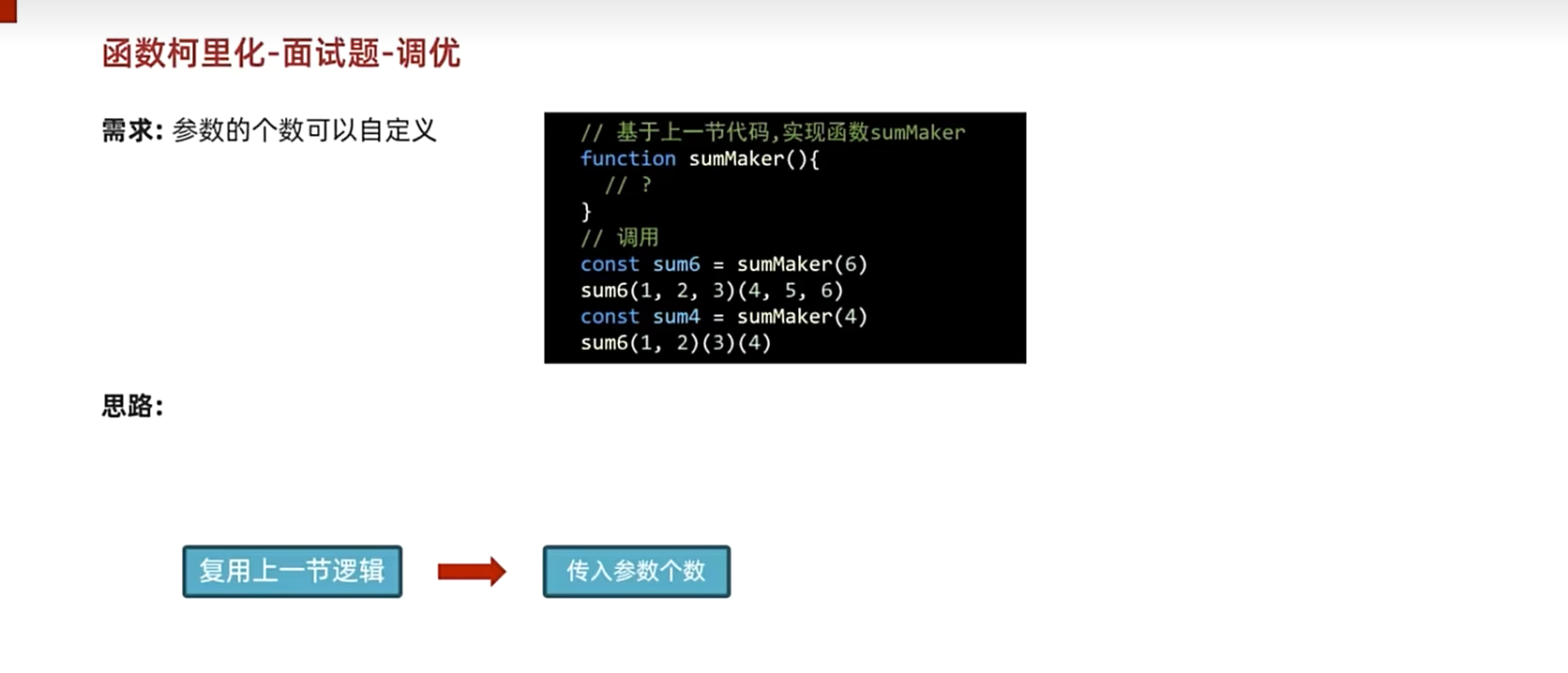
优化版本
js
function sumMaker(length) {
  let nums = [];
  function sum(...args) {
    // @TODO
    nums.push(...args);
    if (nums.length >= length) {
      const res = nums.slice(0, length).reduce((p, v) => p + v, 0);
      nums = []; // 注意累加之后需要清空数组,保证下次累加的值是正确的
      return res;
    } else {
      return sum;
    }
  }
  return sum;
}

const sum6 = sumMaker(6);
sum6(1)(2)(3)(4)(5);

const sum4 = sumMaker(4);
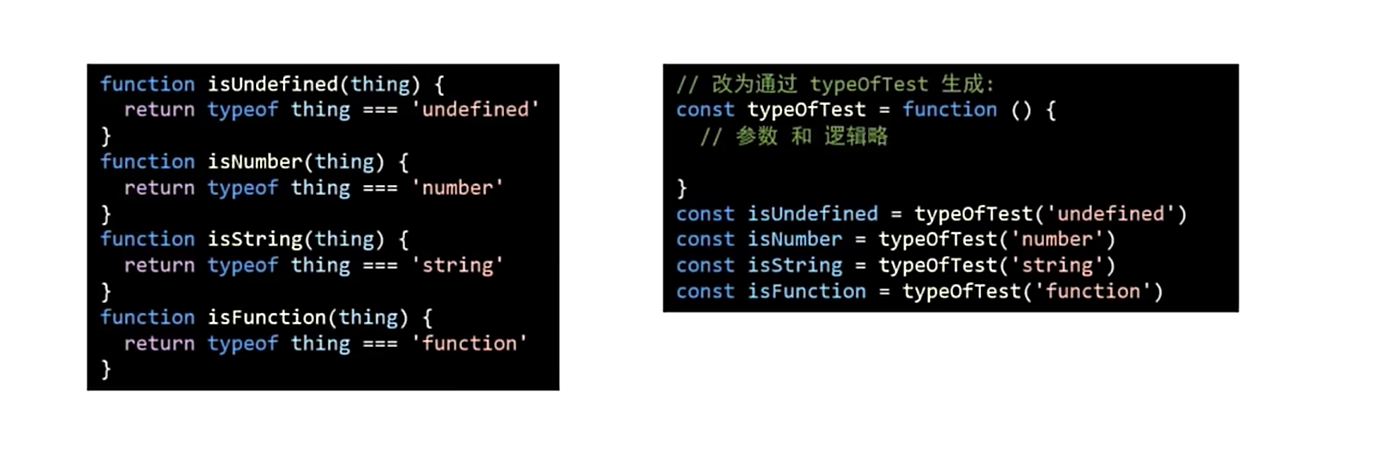
sum4(1)(2)(3)(4);柯里化应用--判断类型
参数复用: 为函数预制通用参数,供给多次重复调用
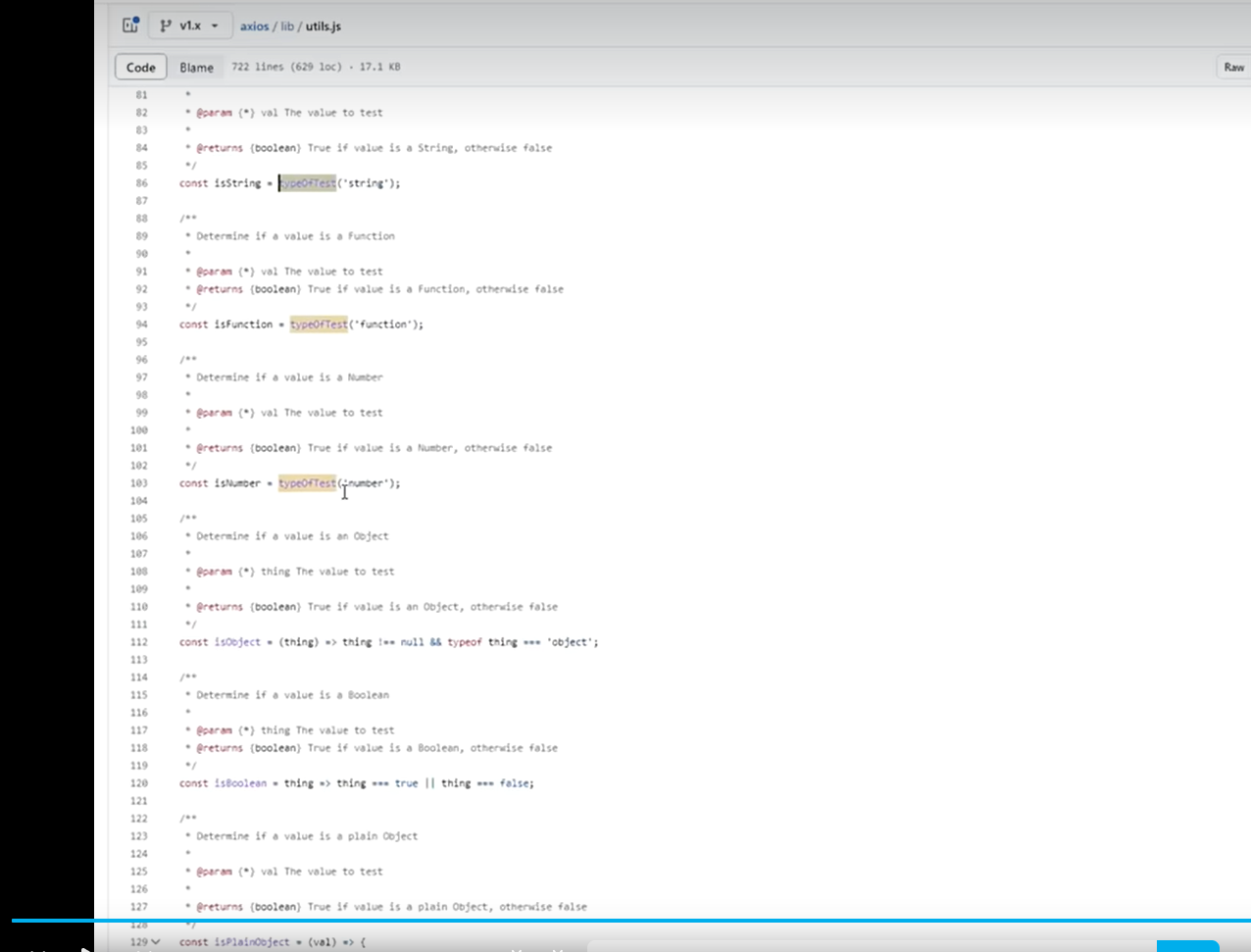
js
const typeOfTest = function (type) {
  return function (obj) {
    // return Object.prototype.toString.call(obj) === `[object ${type}]`
    return typeof obj === type;
  };
};

const typeOfTest = (type) => (thing) => typeof thing === type;

const isString = typeOfTest("string");
const isNumber = typeOfTest("number");
const isBoolean = typeOfTest("boolean");
const isUndefined = typeOfTest("undefined");
const isFunction = typeOfTest("function");

const isObject = (type) => (thing) =>
thing !== null && typeof thing === "object";14. 实现深拷贝
js
function cloneDeep(oldObj) {
  // TODO
  let newObj = Array.isArray(oldObj) ? [] : {};

  for (let k in oldObj) {
    if (typeof oldObj[k] === "object") {
      newObj[k] = cloneDeep(oldObj[k]);
    } else {
      newObj[k] = oldObj[k];
    }
  }

  return newObj;
}15. 最大并发数限制的请求调度器
js
16. 实现异步队列
js
17. 实现 LRU 缓存
js
18. 解析 URL 参数
js
function parseURLParams(url) {
  // @TODO
  const params = {};
  // 提取URL中的查询字符串部分
  const queryString = url.split("?")[1];
  if (!queryString) return params;

  // 分割参数
  const pairs = queryString.split("&");

  for (const pair of pairs) {
    // 处理有等号和无等号的情况
    const [key, value = ""] = pair.split("=");
    // 解码URL编码的字符
    params[decodeURIComponent(key)] = decodeURIComponent(value);
  }

  return params;
}

// 使用URLSearchParams API的简化版本
function parseURLParamsModern(url) {
  const params = new URLSearchParams(url.split("?")[1]);
  return Object.fromEntries(params.entries());
}19. 实现睡眠函数
js
function sleep(ms) {
  // @TODO
  return new Promise((resolve) => setTimeout(resolve, ms));
}

// 使用示例
async function demo() {
  console.log("开始");
  await sleep(1000);
  console.log("延迟1秒后");
}20. 实现数组原型方法
forEach
js
Array.prototype.myForEach = function (callback, thisArg) {
  // @TODO
  for (let i = 0; i < this.length; i++) {
    callback.call(thisArg, this[i], i, this);
  }
};map
js
Array.prototype.myMap = function (callback, thisArg) {
  const result = [];
  for (let i = 0; i < this.length; i++) {
    result.push(callback.call(thisArg, this[i], i, this));
  }
  return result;
};filter
js
Array.prototype.myFilter = function (callback, thisArg) {
  const result = [];
  for (let i = 0; i < this.length; i++) {
    if (callback.call(thisArg, this[i], i, this)) {
      result.push(this[i]);
    }
  }
  return result;
};21 jquery 渲染表格,模拟虚拟 DOM
html
<script src="https://cdn.bootcdn.net/ajax/libs/jquery/1.10.0/jquery.min.js"></script>

<body>
  <div id="container"></div>
  <button id="change-btn">change</button>

  <script>
    var data = [
      {
        name: "张三",
        age: 18,
        sex: "男",
      },
      {
        name: "李四",
        age: 19,
        sex: "男",
      },
      {
        name: "王五",
        age: 20,
        sex: "男",
      },
    ];

    // 渲染函数*/
    var render = function (data) {
      // todo
      var $container = $("#container");

      // 清空容器
      $container.empty();

      // 使用字符串拼接创建整个表格
      var tableHTML = "<table>";

      // 添加表头
      tableHTML +=
        "<thead><tr><th>姓名</th><th>年龄</th><th>性别</th></tr></thead>";

      // 添加表格内容
      tableHTML += "<tbody>";
      data.forEach(function (item, index) {
        tableHTML += "<tr>";
        tableHTML += "<td>" + item.name + "</td>";
        tableHTML += "<td>" + item.age + "</td>";
        tableHTML += "<td>" + item.sex + "</td>";
        tableHTML += "</tr>";
      });
      tableHTML += "</tbody>";
      tableHTML += "</table>";

      // 将整个表格HTML添加到容器
      $container.append(tableHTML);
    };

    $("#change-btn").click(function () {
      data[0].name = "zhangsan";
      data[1].age = 21;
      render(data);
    });

    render(data);
  </script>
</body>22 实现 (5).add(3).minus(2) ===> 输出 6
js
;(function(){
  // 每一个方法执行完,都要返回Number这个类的实例,这样才可以继续调用
  // Number类原型中的方法(链式写法)
  function check(num){
    num = Number(num)
    return isNaN(num)?0: num
  }

  function add(num) {
    num = check(num)
    return this + num
  }

  function minus(num) {
    num = check(num)
    return this - num
  }


  Number.prototype.add = add

  Number.prototype.minus = minus

}());
const res = (5).add(3).minus(2)
console.log(res)23 如何把一个字符串的大小写取反(大写变小写, 小写变大写, 例如 AbC 变为 aBc)
方法1:使用循环
遍历字符串中的每个字符,然后根据其是否为大写或小写来决定是转换为大写还是小写
js
const str = 'AbCdeeeEEf&&&'

const test = (str)=>{
    let s = ''
    for(let i = 0; i< str.length ; i++){
        let item = str[i]
        if (item === item.toUpperCase()) {
            s += item.toLowerCase()
        }else if(item === item.toLowerCase()) {
            s += item.toUpperCase()
        }else{
            s += item
        }
    }

    return s
}

const res = test(str)
console.log('res:', res)方法1:使用ASCII码值进行转换
另一种方法是基于字符的ASCII码值进行转换,这种方法在某些情况下也能工作,但不是最直观的方法
js
const str = 'AbCdeeeEEf'

const test = (str)=>{
    let s = ''
    for (let i = 0; i < str.length; i++) {
        const item = str[i];
        const itemCharCode = item.charCodeAt()
        if (itemCharCode >= 65 && itemCharCode<= 90 ) {
            s += String.fromCharCode(itemCharCode + 32);
        }
        else if (itemCharCode >= 97 && itemCharCode<=122 ) {
            s += String.fromCharCode(itemCharCode - 32);
        }
        else{
            s += String.fromCharCode(itemCharCode)
        }
    }

    return s
}

const res = test(str)
console.log('res:', res)24 实现一个$attr(name, value) 遍历
html
<body>
    <div id="AA" class="box clearfix"></div>
    <div myIn="1"></div>
    <div class="box clearfix"></div>
    <div name="BB"></div>
    <div></div>
    <div id="AA"></div>
    <div myIn="1" class="clearfix"></div>
    <div class="box"></div>
    <div myIn="2"></div>
    <div name="BB"></div>


    <script>
        /*
            实现一个$attr(name, value) 遍历
            属性为name
            值为value的元素集合

            例如如下示例
        */
        function $attr(property, value) {
            // =》获取当前页面中所有的标签
            let elements = document.getElementsByTagName('*');
            let arr = []
            // [].forEach.call(elements, item={});
            elements = Array.from(elements)// 把非数组转换为数组
            elements.forEach(item => {
                // 存储的是当前元素的property 对应属性值
                const itemValue = item.getAttribute(property)
                if (itemValue && itemValue.includes(value)) {
                    arr.push(item)
                }
            });
            return arr
        }

       console.log( $attr('myIn', '1'))
    </script>
</body>25 某公司1-12月数据销售额
js
/*
某公司1-12月数据销售额,存到一个对象里面
如下:{
1: 222,
2: 123,
5: 888
}

请把数据结构处理为如下结构:
[222, 123, null, null, 888,
null,null,null,null,null,null,null,]
*/

var obj = {
  1: 222,
  2: 123,
  5: 888,
};


let arr = new Array(12).fill(null).map((item, index)=>{
    return obj[index + 1]||null
})
console.log(arr)

// -------------------------
// var obj = {
//     1: 222,
//     2: 123,
//     5: 888,
// };

// obj.length = 13;
// let arr = Array.from(obj).splice(1).map(item=> {
//     return typeof item === 'undefined'?null: item
// })
// console.log(arr)

// -------------------------
// var obj = {
//     1: 222,
//     2: 123,
//     5: 888,
// };

// let arr = new Array(12).fill(null)
// Object.keys(obj).forEach(item=>{
//     arr[item - 1] = obj[item]
// })

// console.log(arr)26 给定两个数组, 写一个方法计算它们的交集
js
// 给定两个数组, 写一个方法计算它们的交集
let num1 = [1,2,2,1];
let num2 = [2, 2];
// => 输出结果 [2, 2]


let res = []
num1.forEach(i=>{
 if (num2.includes(i)) {
    res.push(i)
 }
})

console.log(res)


// 给定两个数组, 写一个方法计算它们的交集

let num1 = [1,2,2,1];
let num2 = [2, 2];
// => 输出结果 [2, 2]

let res = []
for (let i = 0; i < num1.length; i++) {
    const item1 = num1[i];
    for (let j = 0; j < num2.length; j++) {
        const item2 = num2[j];
        if (item1 === item2) {
            res.push(item1)
            break
        }

    }
}
console.log(res)